

After experimenting with this new mouse for a few weeks now, I feel I am ready to give you all an accurate look at how Logitech's latest offering in the mouse department.
So what is the Logitech G5 2007? Its obviously a mouse made by Logitech in 2007, more specifically its an upgraded revision of the Logitech G5. The original G5 was the main, corded model in its latest gaming-oriented product line: the G series. The G5 introduced a number of new features improving on Logitechs previous MX-Gaming series. The G5 featured a customizable weight kit so that you could change up the weight of the mouse to your liking. It also featured a sleeved cord of rope, so that the cord doesn't pull on the mouse the way a corded mouse normally would. Perhaps the most celebrated change of all was the switch from optical to laser and a sky-high DPI of 2000.
The G5 was not all rah-rah though, and one seemingly small oversight was enough to keep gamers cradling their beloved MX518's. That feature was the lack of a second thumb button. That feature was enough to keep ME from grabbing a G5 the first time around, once you are used to having that functionality around, the lack of it just feels wrong.
The G5's revision mostly just added the second thumb button and a new black-and-blue tiled grip surface, but
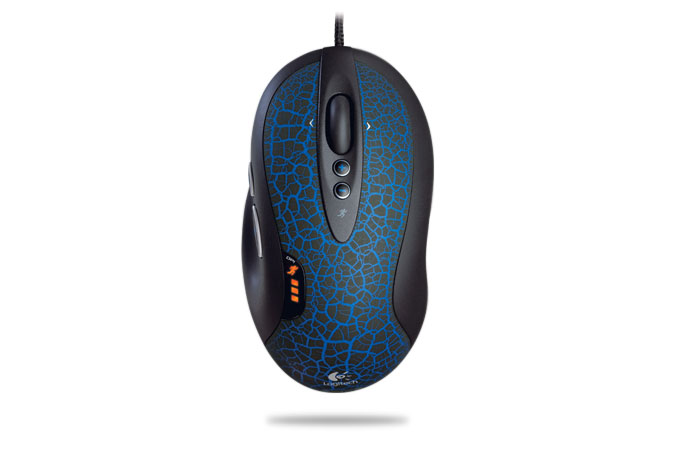 some other, more minor fixes were made. Supposedly, the laser-sensor has been upgraded to track better on more surfaces. I have found personally that the G5 tracks best on smooth, even surfaces such as a wall (however impractical) or more realistically, your table surface. I was prior using a Razer Mantis control surface, a rough mousepad. It made for good tracking on my prior optical mice, but it made the tracking on the G5 go crazy and I could only get good tracking on my pure white table that I use as a desk.
The Logitech Setpoint software has also been updated, allowing you to configure the sensitivity of the control axes independently. You can also overclock the USB port by forcing a faster USB report rate, which worked good except for 1000hz, which I could only squeeze inconsistently low response-rates out of. 500hz delivered
as promised. The difference is literally between 2ms response (500) and 1ms (1000).
As far as performance goes, the G5 set to 2000DPI just seems not to track well. It seems far too jittery no matter how high or low the sensitivity. Setting it to 1600 makes it easier to find a sweet spot-not too slow and not too fast. You can also set lower sensitivities if you're working on a photoshop cutout, or sniping.
PROS:
-When the tracking surface is right, a med-high DPI carries a precise smoothness
-Two thumb buttons
-Cord doesn't pull, next best thing after cordless
-Sensitivity LED bar so you can tell your DPI.
-Gripped surface is nice
CONS:
-Tracking surfaces are picky
-May require some fiddling with the drivers to get to your liking
-High priced for a mouse at $70, but standard for a gaming mouse
-Probably not a must-have if you have the standard G5 and are content with one thumb button.
THE VERDICT:
The Logitech G5 is a great revision that fixes everything wrong (which admittedly, was not much) with its predecessor. Kudos to Logi for listening to what gamers want to see on their mice. The G5 2007 is a solid mouse, and currently the best available mouse, even over the G7 (cordless is still not that big a deal to many gamers). If you are looking to upgrade your mouse from a model as high as the MX518, the G5 2007 is a great upgrade, but not so much so if you already have the old G5 or G7.


3 comments:
CJ the 75thR took away my ability to send PM's....
Mike
Mike, shoot me an email at mastergamer64@gmail.com or get on MSN
It can't get any better than this.
Post a Comment